Background
The Educator Journey platform was designed to train educators working in rural communities. The application delivers structured lessons and assignments through a mobile learning experience.
However, a major operational challenge existed within the product: content creation was dependent on developers. Every time the learning team wanted to add or modify lessons, developers had to manually implement the content into the application.
This process significantly slowed down content publishing and limited the flexibility of the learning team.
To solve this problem, we partnered with a consultancy developing the Educator Journey application and introduced a Content Builder system that allowed non-technical teams to create and publish learning content directly through a dashboard interface.
As the product designer on this initiative, I led the design of the content creation workflow, including the research, system architecture, content layouts, and builder interface.
Project Scope
Platforms
Web Dashboard + Mobile App
Collaboration
External Consultancy Partner
Focus Areas
UX Research, System Design, UI
How Things Worked Before
The Educator Journey application delivers structured lessons to educators through a mobile learning platform.
Each lesson typically includes:
instructional content
media elements such as images or audio
knowledge checks such as quizzes or assignments
Before the introduction of the content builder, the workflow looked like this:
1
The learning team created lesson content manually
2
The content was shared with developers
3
Developers implemented the lesson structure in the application
4
The lesson was deployed to the platform
This process created a strong dependency on the engineering team for content updates.
Even small content changes required development time, making it difficult for the learning team to iterate quickly.
Educator Journey
Mobile Learning Interface
See learning journey

Baseline Results

Your learning journey is made specially for you based on your baseline results!
Key strengths


Technology-enabled Learning

A
Pedagogical Practices

Content Knowledge
Work areas

Learner's Context

Learner's Content Knowledge
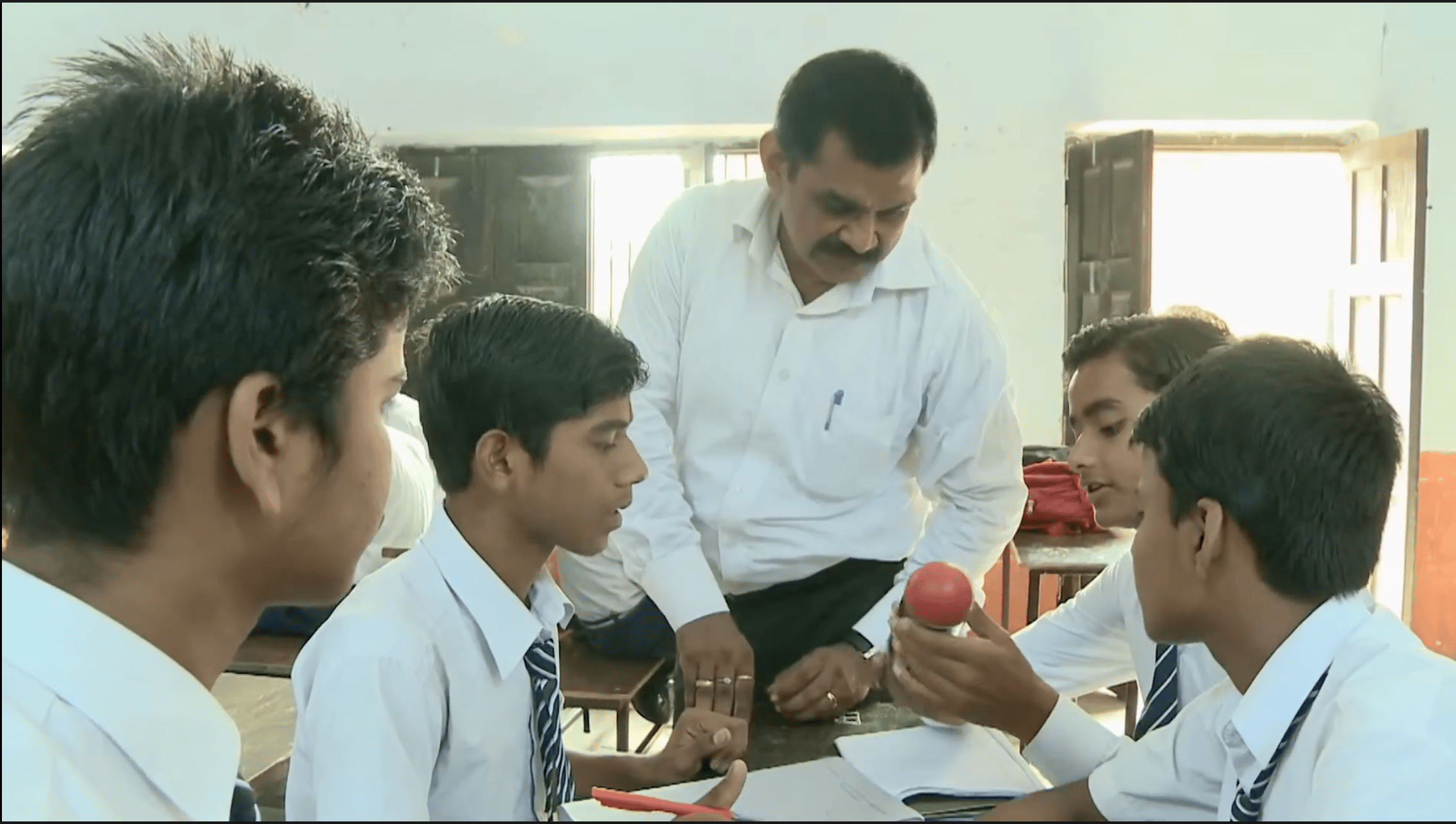
Why do you think the teacher is giving time to students to think about their ideas before he gives them feedback? Select all that apply.


rePlay video


To give time to students process the concept and make meaning

To do some other work while students are engaging in group work
To build on the students's ideas and clarify misconceptions
To give time to students for peer learning


Baseline Test

09
/
18

Previous
Next


Current Subject
What are 21st Century Skills?
8%

Do
Video

1 mins

Do
Video
2 mins
Cards
12 mins
Lesson 2 : Learn about the 21st Century
Lesson 2 description in 1-2 lines goes here.
Start


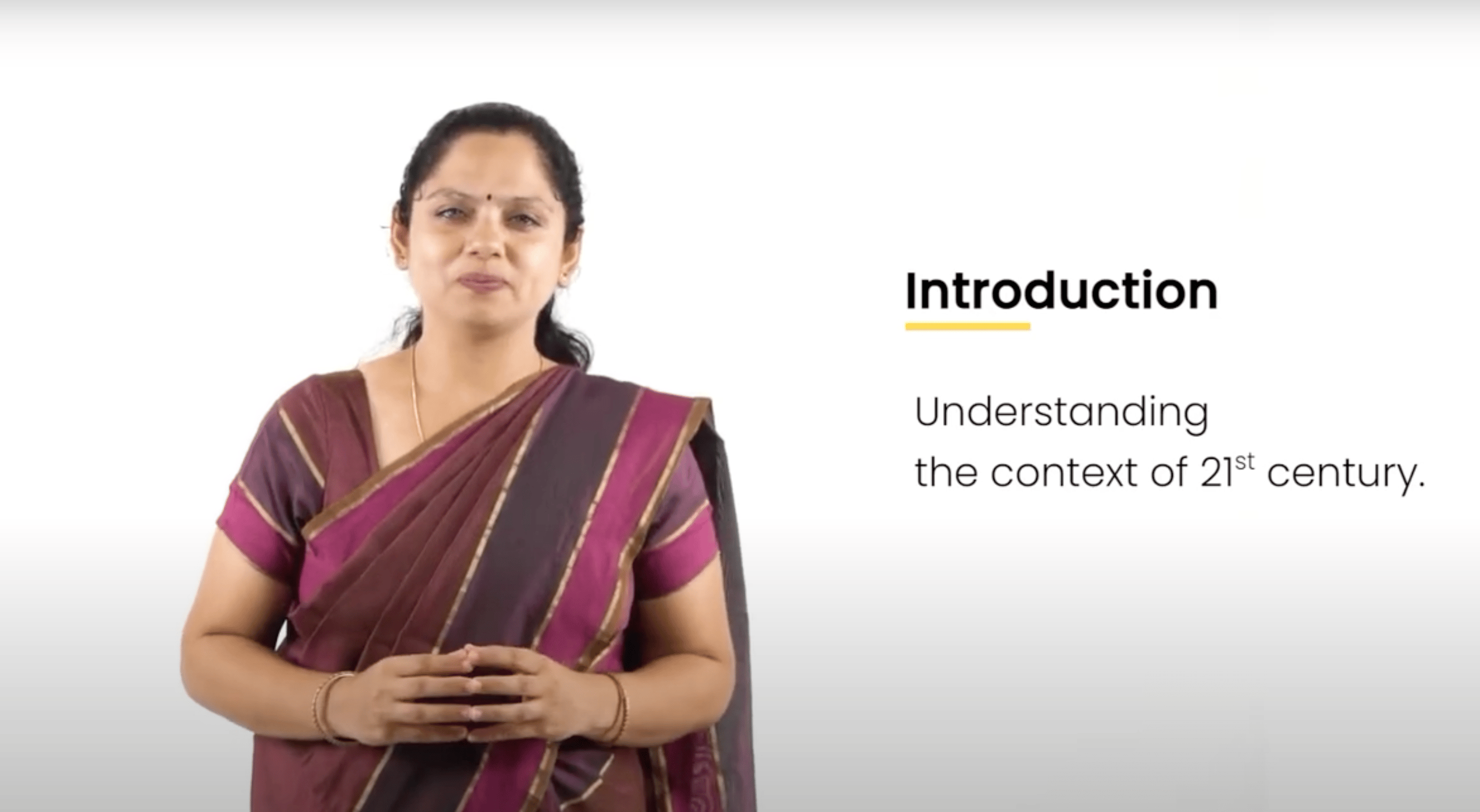

Introduction to the 21st Century
Video
12 mins

Completed
Course 1
Understanding the Context of 21st Century

classroom Challenge
Activity Name
10 mins
Course 2
Nature of job roles in context of 21st century
Pause & think
Think about your learnings
5 Questions
10 mins
Course 3
Why do we need 21st Century Skills?
Course 4
Learning and applying 21st Century skills in learning spaces

subject 2
Creating 21st Century Environment
Complete Subject 1 to unlock.

Home

Profile

More
The Problem We Needed to Solve
As the platform scaled, the dependency on developers for lesson creation became a major bottleneck.
Content creators were responsible for designing educational material, but they lacked the tools to publish their work independently.
This created several challenges:
slow turnaround time for publishing lessons
limited flexibility for updating existing content
heavy reliance on developers for simple content changes
difficulty scaling content creation as the platform grew
The team needed a way to empower content creators to build lessons themselves without requiring engineering support.
Goal Statement
Create a system that allows the learning team to independently build and publish lessons.
Existing work flow
Content Team
→
Developer
→
App Deployment
Finding a Path Forward
To solve the problem, we explored the idea of building an internal content creation tool that would allow the learning team to construct lessons visually.
The concept was to create a Content Builder integrated into the product dashboard, where content creators could assemble lessons using predefined components.
This would eliminate the need for developers to manually build lesson structures.
However, building such a system required understanding how similar tools approached content creation.
Research Findings
As part of the research process, I analyzed existing tools used for building educational content.
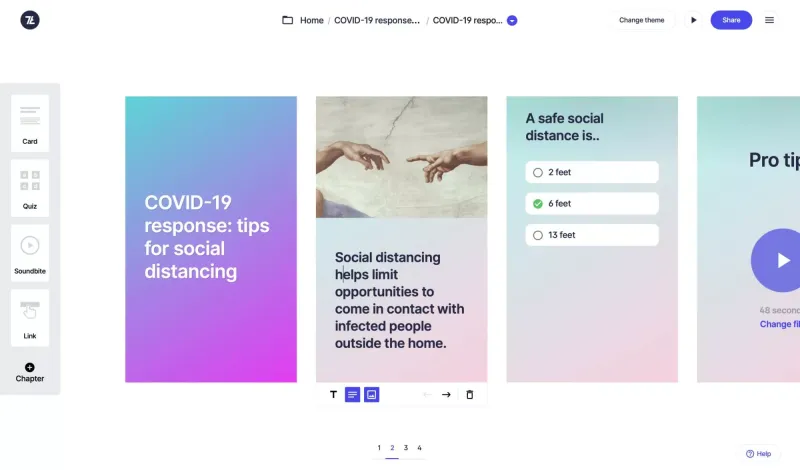
One of the platforms studied was 7Taps, which provides a microlearning content builder.
While the tool demonstrated how modular learning content could be constructed quickly, it also presented several limitations:
fixed layout structures
strict limits on text formatting
limited customization of visual components
restricted control over content presentation
These constraints highlighted an opportunity to design a more flexible builder tailored to our product's needs.
Our Approach
Based on research and analysis, the solution focused on two core principles:
1. Standardized Content Layouts
To ensure lessons remained consistent within the application, predefined layout structures were created.
These layouts defined how content blocks would appear inside the mobile application.
2. Flexible Content Creation
While the layout remained structured, the builder interface needed to provide flexibility for content creators.
Users needed the ability to insert different types of content elements without technical knowledge.
Proposed Work Flow
Content Builder (Dashboard)
→
Lesson Output
→
Mobile App
What We Built
The final solution introduced a dashboard-based Content Builder that allowed content creators to design lessons visually using modular components.
The system included two key parts:
fixed lesson layouts on the mobile application
a flexible drag-and-drop builder interface on the dashboard
Together, these two systems ensured content remained structured while still allowing creators to customize lessons.
Creating the Structure
To maintain consistency within the learning experience, I first designed fixed layout templates for lessons within the mobile application.
Each layout defined how content would be displayed inside the app, using a card-based structure.
These layouts ensured that content created through the builder would render correctly on the mobile platform.
Builder Interface
text content
lesson card layout
media content


What is a 21st century educator?
A 21st-century educator is a mentor who adapts to new tools, encourages critical thinking, and makes learning engaging. They use technology, personalize lessons, and prepare students for the real world.

Previous
Next
Lesson

01
/
05


Show or tell us how you have conducted a flipped classroom activity.

Upload files


Previous
Next
Assessment

01
/
05


Which of these are markers of a 21st-century learning environment? Select all that apply.


Students ask deep, open-ended questions.
Students ask deep, open-ended questions
Students research information to prepare arguement on a given topic
Students get space to take risks, make mistakes and redo
Students use variety of tools, such as digital media, presentations.
Students always solve conflict by complaining to a teacher

Previous
Next
Activity

01
/
05

Designing the Builder Interface
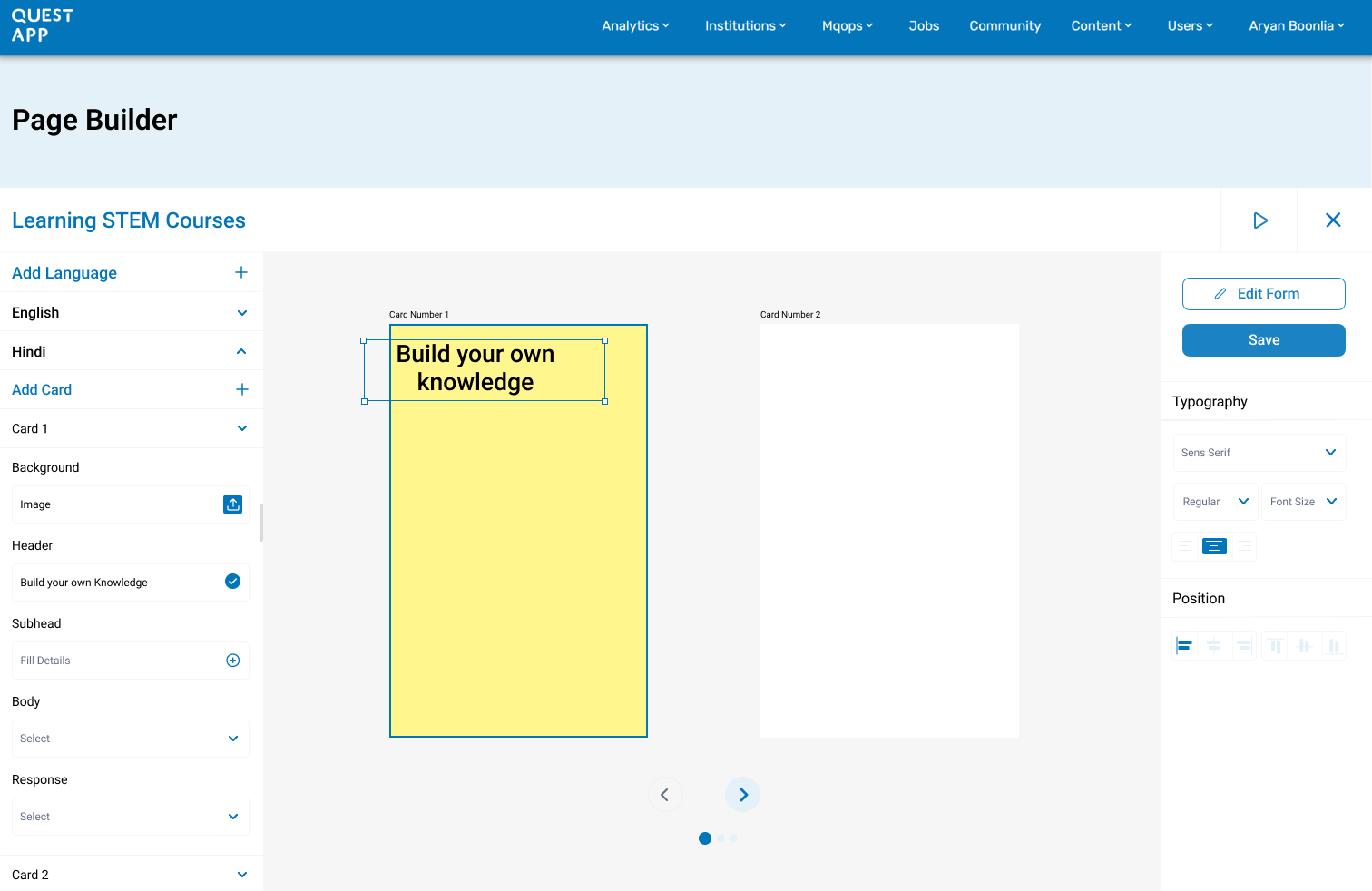
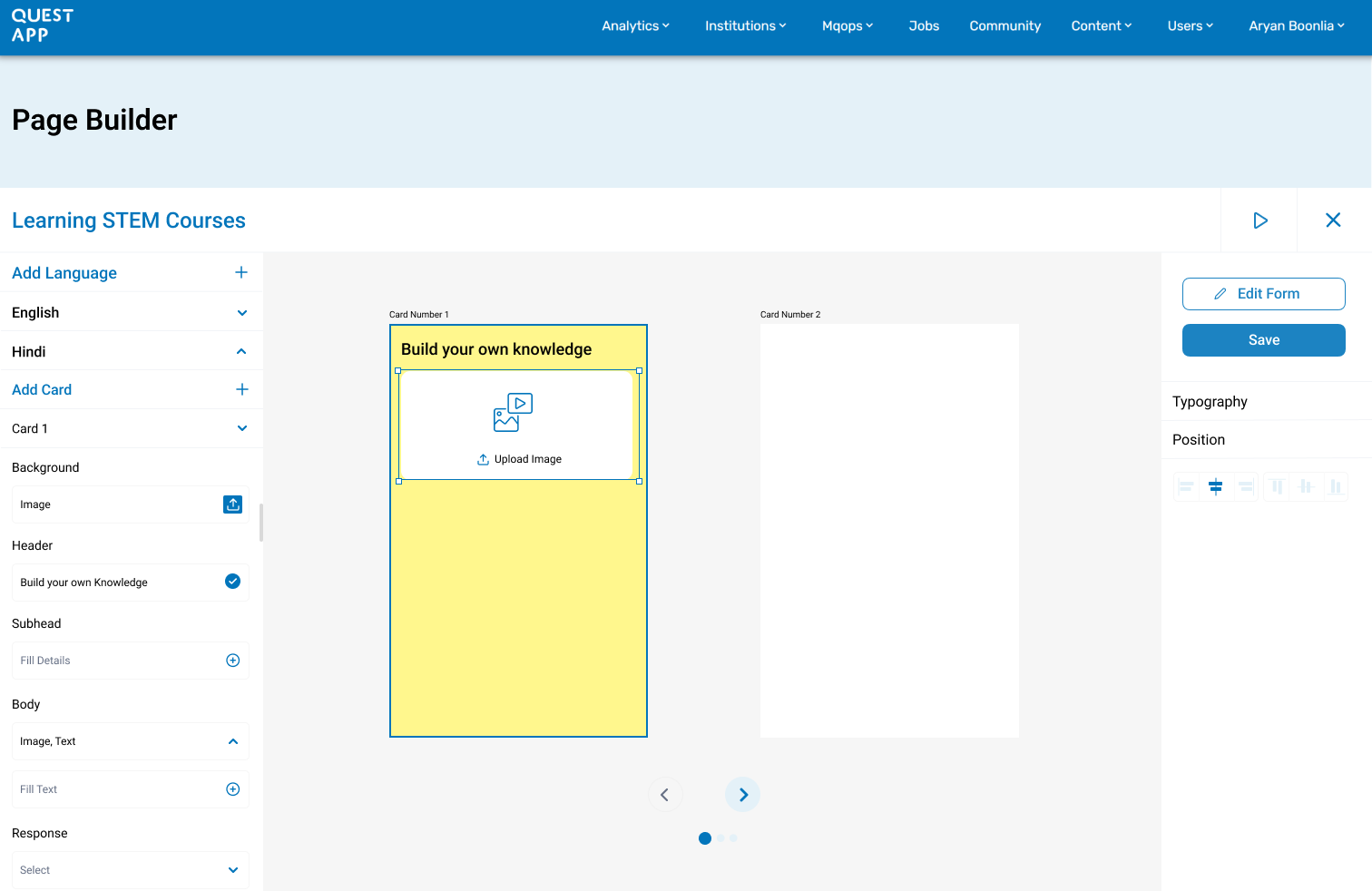
With the lesson layout structure defined, the next step was designing the builder interface that content creators would use.
The dashboard builder allowed users to assemble lessons by inserting different content blocks into the layout.
The interface supported multiple content elements, including:
text blocks
images
audio recordings
multiple choice questions
open text responses
Content creators could customize elements such as:
text size
text color
formatting
question structure
This flexibility allowed the learning team to create rich educational content without requiring engineering support.
Dashboard builder UI • drag and drop content blocks
Making Lessons Interactive
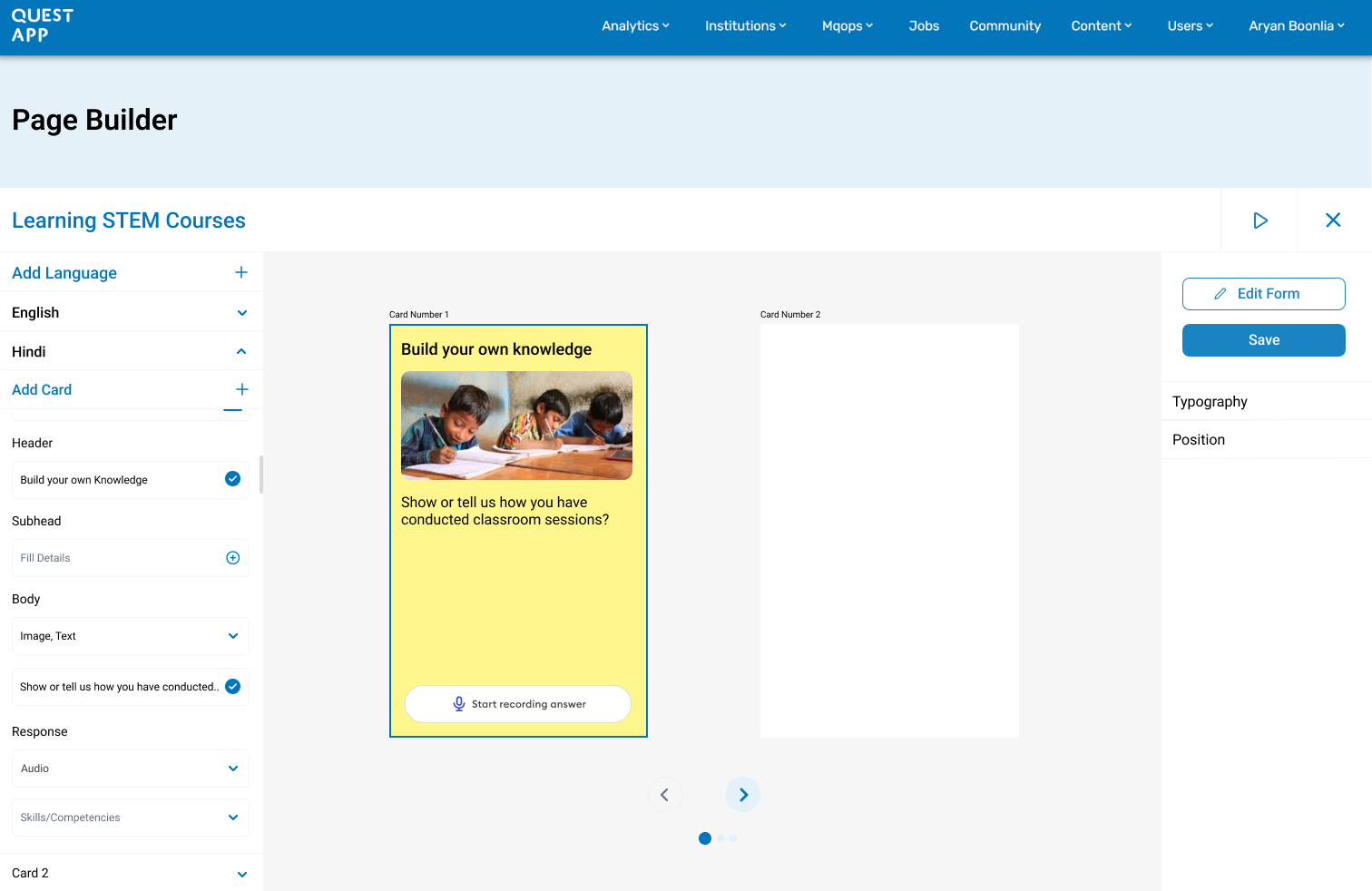
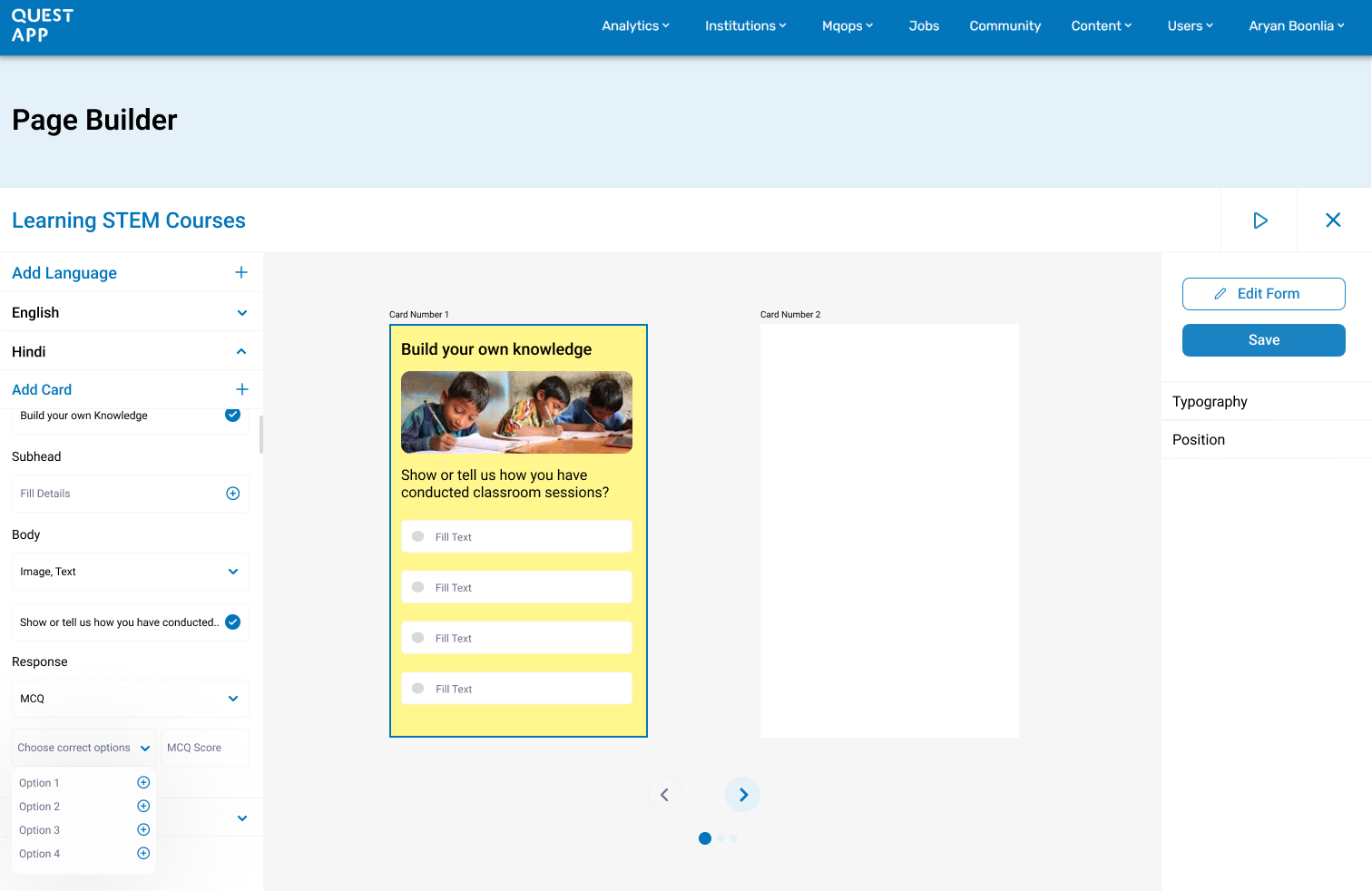
One of the key goals of the builder was enabling interactive learning.
The system therefore included support for several assessment formats:
MCQ questions
open-ended responses
audio responses
media-based prompts
These elements allowed content creators to design lessons that were more engaging and interactive for educators using the platform.
Dashboard builder UI • drag and drop content blocks
Case Study
/
EdTech Platform
/
Content Management System
Designing a Scalable
for Learning Platforms
Content Builder
dashboard.educatorjourney.app
📊
Content Builder Dashboard
Insert screenshot of the content management dashboard interface
Product Designer
Dashboard + Mobile App
Research → Design → System Architecture
2
Platforms designed
100%
Self-service content
∞
Content scalability
4
Team Members
How It All Comes Together
With the content builder implemented, the lesson creation workflow was significantly simplified.
Instead of relying on developers, the process became:
Content Creator
→
Content Builder
→
Instant Deployment
This transformation allowed the learning team to independently create and update educational content.
Visual Placement — New Workflow
Content Builder
→
Mobile App

Page Builder
Learning STEM Courses
Upload
Fill Details
Fill Details
Select
Select
Background
Header
Subhead
Body
Response


Card Number 1
CarResud Number 2
Card Number 3
Card Number 1
Card Number 2

Save
Cards
Typography
Position


Edit Form


Text Box
Image
Video
Audio


1/2

Hindi

Build your own knowledge
Show or tell us how you have conducted classroom sessions?

Fill Text

Fill Text
Fill Text
Fill Text


Previous
Next
Lesson

01
/
05

Build your own knowledge
Show or tell us how you have conducted classroom sessions?
Fill Text

Fill Text
Fill Text
Fill Text
Results
The introduction of the content builder fundamentally changed how learning content was produced within the platform.
Content creators could now design and publish lessons independently, eliminating the need for developer involvement in routine content updates.
This allowed the learning team to iterate faster, experiment with different lesson formats, and scale content production more efficiently.
By combining structured lesson layouts with a flexible builder interface, the system balanced consistency within the mobile experience while empowering non-technical teams to create content freely.
Reflection
Designing the content builder highlighted the importance of creating internal tools that support operational workflows.
While the mobile learning experience remained the primary product, enabling the team behind the product to work more efficiently became equally important.
By removing technical barriers from the content creation process, the builder transformed lesson production from a development task into a creative workflow owned by the learning team.
← Go back
© Aryan Boonlia · Product Designer Built with Figma
View next case study →

What strategy do you use the MOST in your classroom to assess what has students learnt?


Oral or written quizzes after every topic
Observe students when they do an activity
Monthly quizzes on the topics learnt in one month
Presentations by students on what they have learnt


Baseline Test

12
/
18

Previous
Next
Background
The Educator Journey platform was designed to train educators working in rural communities. The application delivers structured lessons and assignments through a mobile learning experience.
However, a major operational challenge existed within the product: content creation was dependent on developers. Every time the learning team wanted to add or modify lessons, developers had to manually implement the content into the application.
This process significantly slowed down content publishing and limited the flexibility of the learning team.
To solve this problem, we partnered with a consultancy developing the Educator Journey application and introduced a Content Builder system that allowed non-technical teams to create and publish learning content directly through a dashboard interface.
As the product designer on this initiative, I led the design of the content creation workflow, including the research, system architecture, content layouts, and builder interface.
Project Scope
Platforms
Web Dashboard + Mobile App
Collaboration
External Consultancy Partner
Focus Areas
UX Research, System Design, UI
How Things Worked Before
The Educator Journey application delivers structured lessons to educators through a mobile learning platform.
Each lesson typically includes:
instructional content
media elements such as images or audio
knowledge checks such as quizzes or assignments
Before the introduction of the content builder, the workflow looked like this:
1
The learning team created lesson content manually
2
The content was shared with developers
3
Developers implemented the lesson structure in the application
4
The lesson was deployed to the platform
This process created a strong dependency on the engineering team for content updates.
Even small content changes required development time, making it difficult for the learning team to iterate quickly.
Educator Journey
Mobile Learning Interface
See learning journey
Baseline Results
Your learning journey is made specially for you based on your baseline results!
Key strengths
Technology-enabled Learning
A
Pedagogical Practices
Content Knowledge
Work areas
Learner's Context
Learner's Content Knowledge
Why do you think the teacher is giving time to students to think about their ideas before he gives them feedback? Select all that apply.
rePlay video
To give time to students process the concept and make meaning
To do some other work while students are engaging in group work
To build on the students's ideas and clarify misconceptions
To give time to students for peer learning
Baseline Test
09
/
18
Previous
Next
Current Subject
What are 21st Century Skills?
8%
Do
Video
1 mins
Do
Video
2 mins
Cards
12 mins
Lesson 2 : Learn about the 21st Century
Lesson 2 description in 1-2 lines goes here.
Start
Introduction to the 21st Century
Video
12 mins
Completed
Course 1
Understanding the Context of 21st Century
classroom Challenge
Activity Name
10 mins
Course 2
Nature of job roles in context of 21st century
Pause & think
Think about your learnings
5 Questions
10 mins
Course 3
Why do we need 21st Century Skills?
Course 4
Learning and applying 21st Century skills in learning spaces
subject 2
Creating 21st Century Environment
Complete Subject 1 to unlock.
Home
Profile
More
The Problem We Needed to Solve
As the platform scaled, the dependency on developers for lesson creation became a major bottleneck.
Content creators were responsible for designing educational material, but they lacked the tools to publish their work independently.
This created several challenges:
slow turnaround time for publishing lessons
limited flexibility for updating existing content
heavy reliance on developers for simple content changes
difficulty scaling content creation as the platform grew
The team needed a way to empower content creators to build lessons themselves without requiring engineering support.
Goal Statement
Create a system that allows the learning team to independently build and publish lessons.
Existing work flow
Content Team
→
Developer
→
App Deployment
Finding a Path Forward
To solve the problem, we explored the idea of building an internal content creation tool that would allow the learning team to construct lessons visually.
The concept was to create a Content Builder integrated into the product dashboard, where content creators could assemble lessons using predefined components.
This would eliminate the need for developers to manually build lesson structures.
However, building such a system required understanding how similar tools approached content creation.
Research Findings
As part of the research process, I analyzed existing tools used for building educational content.
One of the platforms studied was 7Taps, which provides a microlearning content builder.
While the tool demonstrated how modular learning content could be constructed quickly, it also presented several limitations:
fixed layout structures
strict limits on text formatting
limited customization of visual components
restricted control over content presentation
These constraints highlighted an opportunity to design a more flexible builder tailored to our product's needs.
Our Approach
Based on research and analysis, the solution focused on two core principles:
1. Standardized Content Layouts
To ensure lessons remained consistent within the application, predefined layout structures were created.
These layouts defined how content blocks would appear inside the mobile application.
2. Flexible Content Creation
While the layout remained structured, the builder interface needed to provide flexibility for content creators.
Users needed the ability to insert different types of content elements without technical knowledge.
Proposed Work Flow
Content Builder (Dashboard)
→
Lesson Output
→
Mobile App
What We Built
The final solution introduced a dashboard-based Content Builder that allowed content creators to design lessons visually using modular components.
The system included two key parts:
fixed lesson layouts on the mobile application
a flexible drag-and-drop builder interface on the dashboard
Together, these two systems ensured content remained structured while still allowing creators to customize lessons.
Creating the Structure
To maintain consistency within the learning experience, I first designed fixed layout templates for lessons within the mobile application.
Each layout defined how content would be displayed inside the app, using a card-based structure.
These layouts ensured that content created through the builder would render correctly on the mobile platform.
Builder Interface
text content
lesson card layout
media content
What is a 21st century educator?
A 21st-century educator is a mentor who adapts to new tools, encourages critical thinking, and makes learning engaging. They use technology, personalize lessons, and prepare students for the real world.
Previous
Next
Lesson
01
/
05
Show or tell us how you have conducted a flipped classroom activity.
Upload files
Previous
Next
Assessment
01
/
05
Which of these are markers of a 21st-century learning environment? Select all that apply.
Students ask deep, open-ended questions.
Students ask deep, open-ended questions
Students research information to prepare arguement on a given topic
Students get space to take risks, make mistakes and redo
Students use variety of tools, such as digital media, presentations.
Students always solve conflict by complaining to a teacher
Previous
Next
Activity
01
/
05
Designing the Builder Interface
With the lesson layout structure defined, the next step was designing the builder interface that content creators would use.
The dashboard builder allowed users to assemble lessons by inserting different content blocks into the layout.
The interface supported multiple content elements, including:
text blocks
images
audio recordings
multiple choice questions
open text responses
Content creators could customize elements such as:
text size
text color
formatting
question structure
This flexibility allowed the learning team to create rich educational content without requiring engineering support.
Dashboard builder UI • drag and drop content blocks
Making Lessons Interactive
One of the key goals of the builder was enabling interactive learning.
The system therefore included support for several assessment formats:
MCQ questions
open-ended responses
audio responses
media-based prompts
These elements allowed content creators to design lessons that were more engaging and interactive for educators using the platform.
Dashboard builder UI • drag and drop content blocks
Case Study
/
EdTech Platform
/
Content Management System
Designing a Scalable
for Learning Platforms
Content Builder
dashboard.educatorjourney.app
📊
Content Builder Dashboard
Insert screenshot of the content management dashboard interface
Product Designer
Dashboard + Mobile App
Research → Design → System Architecture
2
Platforms designed
100%
Self-service content
∞
Content scalability
4
Team Members
How It All Comes Together
With the content builder implemented, the lesson creation workflow was significantly simplified.
Instead of relying on developers, the process became:
Content Creator
→
Content Builder
→
Instant Deployment
This transformation allowed the learning team to independently create and update educational content.
Visual Placement — New Workflow
Content Builder
→
Mobile App
Page Builder
Learning STEM Courses
Upload
Fill Details
Fill Details
Select
Select
Background
Header
Subhead
Body
Response
Card Number 1
CarResud Number 2
Card Number 3
Card Number 1
Card Number 2
Save
Cards
Typography
Position


Edit Form
Text Box
Image
Video
Audio

1/2
Hindi
Build your own knowledge
Show or tell us how you have conducted classroom sessions?
Fill Text
Fill Text
Fill Text
Fill Text
Previous
Next
Lesson
01
/
05
Build your own knowledge
Show or tell us how you have conducted classroom sessions?
Fill Text
Fill Text
Fill Text
Fill Text
Results
The introduction of the content builder fundamentally changed how learning content was produced within the platform.
Content creators could now design and publish lessons independently, eliminating the need for developer involvement in routine content updates.
This allowed the learning team to iterate faster, experiment with different lesson formats, and scale content production more efficiently.
By combining structured lesson layouts with a flexible builder interface, the system balanced consistency within the mobile experience while empowering non-technical teams to create content freely.
Reflection
Designing the content builder highlighted the importance of creating internal tools that support operational workflows.
While the mobile learning experience remained the primary product, enabling the team behind the product to work more efficiently became equally important.
By removing technical barriers from the content creation process, the builder transformed lesson production from a development task into a creative workflow owned by the learning team.
← Go back
© Aryan Boonlia · Product Designer Built with Figma
View next case study →
What strategy do you use the MOST in your classroom to assess what has students learnt?
Oral or written quizzes after every topic
Observe students when they do an activity
Monthly quizzes on the topics learnt in one month
Presentations by students on what they have learnt
Baseline Test
12
/
18
Previous
Next
Background
The Educator Journey platform was designed to train educators working in rural communities. The application delivers structured lessons and assignments through a mobile learning experience.
However, a major operational challenge existed within the product: content creation was dependent on developers. Every time the learning team wanted to add or modify lessons, developers had to manually implement the content into the application.
This process significantly slowed down content publishing and limited the flexibility of the learning team.
To solve this problem, we partnered with a consultancy developing the Educator Journey application and introduced a Content Builder system that allowed non-technical teams to create and publish learning content directly through a dashboard interface.
As the product designer on this initiative, I led the design of the content creation workflow, including the research, system architecture, content layouts, and builder interface.
Project Scope
Platforms
Web Dashboard + Mobile App
Collaboration
External Consultancy Partner
Focus Areas
UX Research, System Design, UI
How Things Worked Before
The Educator Journey application delivers structured lessons to educators through a mobile learning platform.
Each lesson typically includes:
instructional content
media elements such as images or audio
knowledge checks such as quizzes or assignments
Before the introduction of the content builder, the workflow looked like this:
1
The learning team created lesson content manually
2
The content was shared with developers
3
Developers implemented the lesson structure in the application
4
The lesson was deployed to the platform
This process created a strong dependency on the engineering team for content updates.
Even small content changes required development time, making it difficult for the learning team to iterate quickly.
Educator Journey
Mobile Learning Interface
See learning journey
Baseline Results
Your learning journey is made specially for you based on your baseline results!
Key strengths

Technology-enabled Learning
A
Pedagogical Practices

Content Knowledge
Work areas
Learner's Context
Learner's Content Knowledge
Why do you think the teacher is giving time to students to think about their ideas before he gives them feedback? Select all that apply.
rePlay video
To give time to students process the concept and make meaning
To do some other work while students are engaging in group work
To build on the students's ideas and clarify misconceptions
To give time to students for peer learning
Baseline Test
09
/
18

Previous
Next
Current Subject
What are 21st Century Skills?
8%
Do
Video
1 mins
Do
Video
2 mins
Cards
12 mins
Lesson 2 : Learn about the 21st Century
Lesson 2 description in 1-2 lines goes here.
Start

Introduction to the 21st Century
Video
12 mins
Completed
Course 1
Understanding the Context of 21st Century
classroom Challenge
Activity Name
10 mins
Course 2
Nature of job roles in context of 21st century
Pause & think
Think about your learnings
5 Questions
10 mins
Course 3
Why do we need 21st Century Skills?
Course 4
Learning and applying 21st Century skills in learning spaces

subject 2
Creating 21st Century Environment
Complete Subject 1 to unlock.
Home

Profile

More
The Problem We Needed to Solve
As the platform scaled, the dependency on developers for lesson creation became a major bottleneck.
Content creators were responsible for designing educational material, but they lacked the tools to publish their work independently.
This created several challenges:
slow turnaround time for publishing lessons
limited flexibility for updating existing content
heavy reliance on developers for simple content changes
difficulty scaling content creation as the platform grew
The team needed a way to empower content creators to build lessons themselves without requiring engineering support.
Goal Statement
Create a system that allows the learning team to independently build and publish lessons.
Existing work flow
Content Team
→
Developer
→
App Deployment
Finding a Path Forward
To solve the problem, we explored the idea of building an internal content creation tool that would allow the learning team to construct lessons visually.
The concept was to create a Content Builder integrated into the product dashboard, where content creators could assemble lessons using predefined components.
This would eliminate the need for developers to manually build lesson structures.
However, building such a system required understanding how similar tools approached content creation.
Research Findings
As part of the research process, I analyzed existing tools used for building educational content.
One of the platforms studied was 7Taps, which provides a microlearning content builder.
While the tool demonstrated how modular learning content could be constructed quickly, it also presented several limitations:
fixed layout structures
strict limits on text formatting
limited customization of visual components
restricted control over content presentation
These constraints highlighted an opportunity to design a more flexible builder tailored to our product's needs.
Our Approach
Based on research and analysis, the solution focused on two core principles:
1. Standardized Content Layouts
To ensure lessons remained consistent within the application, predefined layout structures were created.
These layouts defined how content blocks would appear inside the mobile application.
2. Flexible Content Creation
While the layout remained structured, the builder interface needed to provide flexibility for content creators.
Users needed the ability to insert different types of content elements without technical knowledge.
Proposed Work Flow
Content Builder (Dashboard)
→
Lesson Output
→
Mobile App
What We Built
The final solution introduced a dashboard-based Content Builder that allowed content creators to design lessons visually using modular components.
The system included two key parts:
fixed lesson layouts on the mobile application
a flexible drag-and-drop builder interface on the dashboard
Together, these two systems ensured content remained structured while still allowing creators to customize lessons.
Creating the Structure
To maintain consistency within the learning experience, I first designed fixed layout templates for lessons within the mobile application.
Each layout defined how content would be displayed inside the app, using a card-based structure.
These layouts ensured that content created through the builder would render correctly on the mobile platform.
Builder Interface
text content
lesson card layout
media content
What is a 21st century educator?
A 21st-century educator is a mentor who adapts to new tools, encourages critical thinking, and makes learning engaging. They use technology, personalize lessons, and prepare students for the real world.
Previous
Next
Lesson
01
/
05
Show or tell us how you have conducted a flipped classroom activity.

Upload files

Previous
Next
Assessment
01
/
05
Which of these are markers of a 21st-century learning environment? Select all that apply.

Students ask deep, open-ended questions.
Students ask deep, open-ended questions
Students research information to prepare arguement on a given topic
Students get space to take risks, make mistakes and redo
Students use variety of tools, such as digital media, presentations.
Students always solve conflict by complaining to a teacher
Previous
Next
Activity
01
/
05
Designing the Builder Interface
With the lesson layout structure defined, the next step was designing the builder interface that content creators would use.
The dashboard builder allowed users to assemble lessons by inserting different content blocks into the layout.
The interface supported multiple content elements, including:
text blocks
images
audio recordings
multiple choice questions
open text responses
Content creators could customize elements such as:
text size
text color
formatting
question structure
This flexibility allowed the learning team to create rich educational content without requiring engineering support.
Dashboard builder UI • drag and drop content blocks
Making Lessons Interactive
One of the key goals of the builder was enabling interactive learning.
The system therefore included support for several assessment formats:
MCQ questions
open-ended responses
audio responses
media-based prompts
These elements allowed content creators to design lessons that were more engaging and interactive for educators using the platform.
Dashboard builder UI • drag and drop content blocks
Case Study
/
EdTech Platform
/
Content Management System
Designing a Scalable
for Learning Platforms
Content Builder
dashboard.educatorjourney.app
📊
Content Builder Dashboard
Insert screenshot of the content management dashboard interface
Product Designer
Dashboard + Mobile App
Research → Design → System Architecture
2
Platforms designed
100%
Self-service content
∞
Content scalability
4
Team Members
How It All Comes Together
With the content builder implemented, the lesson creation workflow was significantly simplified.
Instead of relying on developers, the process became:
Content Creator
→
Content Builder
→
Instant Deployment
This transformation allowed the learning team to independently create and update educational content.
Visual Placement — New Workflow
Content Builder
→
Mobile App
Page Builder
Learning STEM Courses
Upload
Fill Details
Fill Details
Select
Select
Background
Header
Subhead
Body
Response
Card Number 1
CarResud Number 2
Card Number 3
Card Number 1
Card Number 2
Save
Cards
Typography
Position

Edit Form
Text Box
Image
Video
Audio
1/2
Hindi
Build your own knowledge
Show or tell us how you have conducted classroom sessions?
Fill Text
Fill Text
Fill Text
Fill Text
Previous
Next
Lesson
01
/
05
Build your own knowledge
Show or tell us how you have conducted classroom sessions?
Fill Text
Fill Text
Fill Text
Fill Text
Results
The introduction of the content builder fundamentally changed how learning content was produced within the platform.
Content creators could now design and publish lessons independently, eliminating the need for developer involvement in routine content updates.
This allowed the learning team to iterate faster, experiment with different lesson formats, and scale content production more efficiently.
By combining structured lesson layouts with a flexible builder interface, the system balanced consistency within the mobile experience while empowering non-technical teams to create content freely.
Reflection
Designing the content builder highlighted the importance of creating internal tools that support operational workflows.
While the mobile learning experience remained the primary product, enabling the team behind the product to work more efficiently became equally important.
By removing technical barriers from the content creation process, the builder transformed lesson production from a development task into a creative workflow owned by the learning team.
← Go back
© Aryan Boonlia · Product Designer Built with Figma
View next case study →
What strategy do you use the MOST in your classroom to assess what has students learnt?
Oral or written quizzes after every topic
Observe students when they do an activity
Monthly quizzes on the topics learnt in one month
Presentations by students on what they have learnt
Baseline Test
12
/
18

Previous
Next